*yawns*
Welcome to Day 9, of myself trying to fully complete JeroWorks 3.0. I’ve learned a few things today, such as what a ‘little’ Rexouium-shaped ‘Birb‘ told me of how to make backups of my project folder in an efficient manner. This is the only true way
to ‘unfuck’ my work.
“Always remember to backup.” -Some random person
But what I haven’t learned, is why in the FUCK the Contact Receivers are ignoring
my Transform settings. This behavior is baffling the helpers as well. …That’s not good. If they can’t help, I’m screwed.
Though I was forced to expose the project to show them proof where I put the objects
in, where I put the Transform settings, and where it’s actually grabbing. They suggested to delete the Reset Target and re-add it. That didn’t fix the issue. Clearly I fucked something up so bad with that ‘idea’ I had. 🤦♂️
One helper said “here’s an idea. Do you have a backup of your Drexouium somewhere that you made no changes to? Restore it and link your existing framework to it, and see if it happens there as well.”
So this would be my 3rd attempt. As they say.. “3rd time’s the charm”. Let’s hope it happens here as well. …AND it didn’t! It still grabs at the object’s origin point! One good thing is the issue of it showing up at spawn, is gone. But a NEW bug has replaced it! Now the object isn’t resetting to its origin point when I turn it off! It uses its last location instead.
The only thing I can think of, is because I was.. rushing to get this fucking thing in a test state. I guess you can tell I’m getting tired trying to fix these bugs. I seriously need
another Atherian-like person to sit down AND HELP ME in a call!!! I’m sick of having to ask for help, and waiting hours! It’s getting ridiculous! I want this fucking project DONE NOW!!! It’s been over a WEEK!! 😣
…Please, God. If you’re listening. PLEASE let someone who knows how to do this, show up and be willing to let me call them, so I can finally FIX THIS INSANITY!! I don’t care
if I’m ‘forced to expose my project’ anymore! I WANT THESE ISSUES FIXED!!! 😖
Half of me feels like stepping away from this project and cool off, while my
other (determined) side says “No!! ..Must fix issues! Must.. fix.. issues!! Must.. make.. JeroWorks 3.0.. WORK!!” And no, it has nothing to do with Jero himself. It’s me, putting my mind to something, and expecting results for my effort.
Or just going insane at this point.
The only thing, I can think of at this point…, is the Reset Target has a lot to do with where the object is (actually) being grabbed (in relation to the Transform). Something, is overriding the Transform.
It could be the angle of it. It could even be the framework bugging on me.
I just.. I’ve already said my peace. I need. someone. to call me, and look at this mess I’ve created. Showing pictures, and them trying to explain, is not solving the issue anymore. The only thing that will, is them seeing my project in real time. Then they’ll be all “OH!! I see the problem! Try X! That should help.”
This is what I need at this point. No more having to explain my issues. No more asking for help. I need someone that can help me, in a call. Someone I can speak to. ..This is the only way to fix the issues now (or tell me “I’m sorry but what took you over a week, 3.0 won’t do for you.”). And in that case, I’ll say.. HELLO 2.0! I missed you, bud! Let’s fire up World Fixed IK and Final IK, and do what I want.
EDIT: I had time to calm the F down and tried to help who I could. One person was using the wrong Unity version, another person’s all “I want to learn how to build avatars but I’m also willing to get commissions”. And I said “there’s several websites out there that will do commissions”.
Turns out the person is a complete newbie to Unity. Hasn’t uploaded anything. Ahh the memories of uploading my first avatar, before you didn’t have to be a ‘New User’ (because the Trust & Safety system didn’t exist back then) to upload. How they thought I was trying to retexture, and one guy was like “I think all he wants is to upload the avatar”.
Good times, good times. But enough with the trip down memory lane. One user
named ‘catboy’ tried to help the person. Why am I naming him? He’s the one that helped me in a call.
He told me he’s been wanting to help me for awhile but couldn’t, that what I wanted
was “big brain time”. But he was willing to listen as I explained the entire idea of the project. He also didn’t really think of much when he saw the names of the clones, and even said “Jaro”. Was a bit interesting. Glad I can trust him with such an important (to
me) project.
There were a few times where it felt he couldn’t help me, until I said “here, let me get in VR to show you what happens”. When he saw that, he said “Yes, I believe I know how to solve this. In theory.” The fix was actually quite simple, which I will have to apply to all of the
objects: take the Jero clone and position the Contact Receiver’s transform where it’ll be sitting on the palm of my avatar’s left hand.
When doing this for the Idle Pose one, it was the rock that killed both issues!! WOOT!! “But I see an issue here. I might be able to work out a plan that will prevent your objects from ever spawning at world spawn again,” he said. I was quite excited of this news as he pulled up MS Paint and started drawing out ideas for him to understand how to place this into my existing foundation.
The idea be eventually came up with was.. ironically similar to the idea I had for the
two Snuggle poses (but with a much less risk of fucking up the project). Add a second reset point, infront of me. But this one won’t mess with the original. It started with changing
the ‘brains’ of the foundation a little.
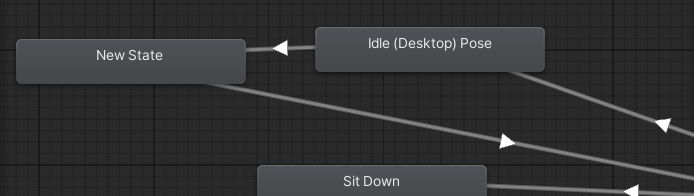
And also this..
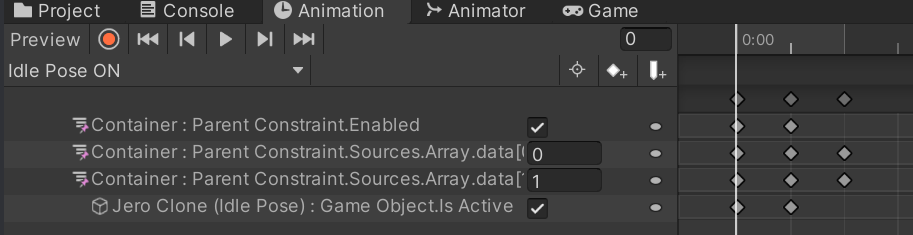
And finally, this (which really.. was confusing that he wanted me to set the object like this). But this is where the new reset point is.
I’ll fix it later though.
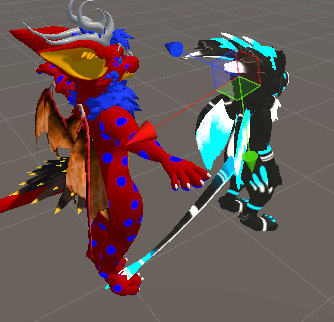
After those three things (really using the number ‘3’ here with JeroWorks 3.0, aren’t we? Feels like I’m marketing my own project, which I’m not), it was time to go back in VR and test.
At first it didn’t work, but he had a fix for this (which is the New State of the second picture). He explains how it “relinquishes control of Parent Constraint” for me to grab it. And after the quick fix..

IT WORKS (again)!! Dude, you’re awesome! Thank you thank you THANK YOU!! 🤗 You saved my project, and my sanity! 😄
I loved how extremely patient he was with me. He really had the same “let’s butcher some issues” attitude I did.
With it once again fixed, as I said I’ll need to apply the fixes to the remaining 10 objects. But I’ve made a project backup before I start work on that, to make this ‘Benie-proof’.