Benie’s VR Adventures – Day 5

Holy hell, now this is a super delayed post! This was originally supposed to be published on the 1st (before I had gotten Moss (then VRChat gets updated and I need to be there for that)… then my back goes out on me, and I was unable to do the rest.
But finally, after just over a week of a delay, I’m able to publish it!

So anyway, I’ve downloaded seven free VR games from Steam (to give me something else to do than VRChat all the time), that use motion controllers.
Consider this as a mini-review of all these games, and if they’re right for you if you’re also low on cash after buying your VR set;
Cave Digger
Danger Room VR
Guns’n’Stories: Preface VR
La Camila : A VR Experience
MSI Electric City: Core Assault
Taphouse VR
and finally…
Waltz of the Wizard

Without further adieu, here’s the games I played in no particular order…
Cave Digger
VR Orientation Type: Standing(Room-Scale)
I originally read the title as ‘Grave Digger’ when I saw it on Steam. It features the VR player in a mine elevator (that cannot be exited). Infront of them is a simple pickaxe, used to mine the exposed sides of the shaft. The player is given 60 seconds to mine precious ore and gems as fast as they can, and grabbing them with the other empty hand, then throw them in the bin in the middle of the elevator to get money. They can see how long they have left by looking at the top of one of the hands. Once time runs out, the elevator automatically goes to another floor, and the process starts again with another 60 seconds.
There are about three floors. After the third, the player’s findings are counted up to be the total of that run.
Here the player can use their money to buy special tools, such as a drill to place dynamite in, a saw to cut the rock around hard to reach gems, a detector that locates gems in the rock, and others.
The trick is to choose these tools carefully (while still trying to beat the clock). The player also has to have one of their hands open in order to pick up gems, but I believe (from what I’ve seen) they can also use the bucket to scoop them up as the gems go by them. In one level, the player can also extract oil from the rock (by using the drill and the bucket), which nets them lots of cash.
Back at the tool purchase screen, the player can either choose this Challenge Mode or play Regular Mode (by using one of their available hands to click on the button with the primary trigger).
From my observations, getting the scanner, the cutter, and the bucket are the most efficient ways of making money. But if anyone else playing this game knows of a better way, be sure to tell me.
– I have two complaints about this game, though.
1. I’d like to see a sandbox mode, to get a feel for the tools (plus understand the overall value of each gem/ore, including the oil). Being rushed feels like I’m barely learning. Granted, it does give the player a tutorial on how to use the tool after starting a new run.
2. The upgrades (to me) feel too cheap. Once the player gets them all, the only thing the ingame money can get them is more dynamite. By then, money becomes
pointless (IMHO).
——
MSI Electric City: Core Assault
VR Orientation Type:
Standing/Sitting
For owning an MSI-born AMD graphics card, I should feel honored to play this (with all the MSI licensed logos (such as the dragon logo on the floor).
This feels similar to that ship defending minigame of The Lab, including having two
gamemodes; Time Attack (the main gamemode) and Survival Mode (permadeath).
So there’s a surprise twist from that other game. Not only does the player got to dodge fire coming towards their ship, they have friendly turrets that must be protected. The player can also occasionally fire ‘destroy everything infront of them’ rockets.
The game is really, really fun. But if I was to choose which is the better game, I say the one from The Lab (for having the homing missiles coming after the player’s ship-mounted hand).
By the way, Feel free to beat my high scores: 16200 on Survival Mode, and 13250 on Time Attack.
——
Taphouse VR
VR Orientation Type:
Standing(Room-Scale)
What an interesting name for a game title. So this game involves the VR player tending to a bar (which is best played while standing up).
There are five levels of difficulty. Each level has a normal and sandbox mode. IMHO, playing in Sandbox mode is highly recommended, because it helps the playe master all the mechanics, for there is a lot to learn. Drink size (and where these drinks are), drink
type (especially when it’s a mix), and so on.
As soon as the customer orders their drink (be it a single one, or a mix of 2 or more drinks), the player has 45 seconds to complete the order. Simply grab the glass they want, find their requested drink (or drinks if it’s a mix), and pour. If it’s a mix of two or three, be sure to pour the one the guy wants more of, and topped with the other. Then hand it over to the guy.
If it’s what he wants, he’ll drink it and pays the player.
-One thing that actually annoyed me with this game, is when a customer wants a mix of three (all at 33%). It seems no matter which way I do it, the customer doesn’t like it. It came to the point where I said “fuck you, get out of my bar!”
They need to make it (in Sandbox mode), where it would actually show just how much the player puts in (to make sure they get it right).
——
Guns’n’Stories: Preface VR
VR Orientation Type:
Standing (main menu), Standing/Sitting (main game)
This looked like a hell of a game, based around one of those old arcade shoot’em’up games where the player is in a stationary position, defending themself for attacks from multiple directions.
Now this game, is actually a free demo of the actual game Guns’n’Stories: Bulletproof VR (which is a single Alexander Hamilton(a $10 bill) on Steam).
In this demo, there are a total of three levels. And they can get quite intense with more enemies filling the screen. The player can set the difficulty from ‘Baby’ (gives infinite ammo with no reload) to ‘Elite’. I was quite surprised there’s actually a difficulty level below ‘Easy’.
What’s even more hilarious, is the player starts with a baby bottle in their left hand, and a rattler in their right (it even makes rattling sounds if the player shakes their right controller). Gotta love that dev humor.
As I said before, the gameplay is the player versus enemies popping in at random spots. Longer the player plays, more enemies will pop up (and the harder they’ll get, such as ones that are running towards the player). And it can get pretty intense. If the player takes enough damage, time slows down for them to more accurately line up their shots (and kill anyone causing them to hit this state).
In two of these three levels, the weapons available to the player, change into much more powerful ones (to where they’re mowing down enemies left and right).
——
La Camila : A VR Experience
VR Orientation Type:
Standing(Room-Scale)
Now this one isn’t really a game, but a semi-interactive story in VR. After RL suffering from a bad back (due to my own stupidity of dancing in VR), I’m finally back to properly review this game.
First off, VR player receives two tools; the right hand is one of those old time spyglasses. When the controller vibrates, look for a blue eye and use the spyglass to keep that eye centered. Do it long enough, and the player will be teleported to that location. The left hand, is a ‘cloud hand’. Put it inside of a cloud to make things happen.
And to best explain the story (this took awhile until it finally started to make sense in my head); imagine where mother nature had a natural enemy (other than what us humans are doing to our planet), but the power to control weather via sheep wool (and also have the availability to surf on a cloud).
However, mother nature is always watching, and one night spawns in these strange reddish clouds to destroy the large cloud-making machine.
– The issues I had with this thing, are thus;
1. It was too short, but this is to be expected (as it’s free).
2. There are a few parts where I wish I could control the volume, where my ears feel like they’re in pain.
3. It assumes the player has a large playspace.
——
Waltz of the Wizard
VR Orientation Type:
Standing(Room-Scale)
Who doesn’t like shooting fire from your hands, and controlling the gravity of nearly everything in the room? This is what this game is about, and it features a rather unique way of movement.
Instead of typically teleporting the VR player to the spot you choose, it creates a path it will follow to reach where they release the primary trigger. The player then starts mini-teleporting themself over to it. The player can also ‘run’ to it (by moving their controllers back and forth). ..Personally I’m not a real fan of this new way of movement, especially if you make a mistake.
The main room is where the (literal) magic happens. The player has a bunch of items on the table, and things scattered around the room. The object is to combine some of these items in the pot to hopefully unlock a spell. There is no hand-holding; it’s all guesswork and experimentation of trying to figure out the correct recipe, only a skull that tends to nag at you if you get it wrong.
If the player accidentally throws things off the table, wait a few seconds and the item(s) will magically re-appear where they were (including the skull, which I personally wish would -not- respawn).
There is also another area I’ve discovered (that wasn’t seen in the video provided by the creator on the store page). Here the player can brandish …weapons for some reason (swords and a crossbow). Apparently there is a FPS-like element in this game. Turning one corner, and I see this knight humanoid-like creature on the far side of the room. Then he starts walking towards me in a brisk pace, and I’m frozen in fear not remembering the controls.
This thing is now a few feet from my RL face, and I finally kill it. Stand there, then put the controllers down and take the headset off, saying “NOPE! NOPE nope nope!”… fuckin’ HELL, that scared the shit out of me!! My body clearly wasn’t ready for this.
——
Danger Room VR
VR Orientation Type:
Standing(Room-Scale)
…Hoo wee! So many things to dodge in this game, is quite crazy.
I was warned that my play space was too small for this game. Luckily I was still able to do it.
So what is this game? It’s actually more of a simulation (as most VR games that I’ve seen are), but it’s a lot more interactive than La Camila : A VR Experience. First, let’s talk about what the player will have in their hands. The left hand is a grabber. It grabs orbs during gameplay. The right hand is a blaster (unlimited ammo, but has a cooldown time if the player uses it too much).
To start, the player gets this orb (that the game tells them to). A round lasts for a minute, and it’s the job of the player to gather as many orbs as they can before time runs out, while also defending themself against enemy orbs, lasers coming from the ceiling, mines coming from the wall, and a space squid that will hamper the player’s ability to grab orbs.
I imagine if I had a much bigger play space (with a lot less furniture), it would feel more fun (aka why it said I didn’t have the required space needed).

.
.
And that, finally, completes this overly-delayed blog post. Since this post, I downloaded more free games that I’ll be playing.
Posted in VR | Comments Off on Benie’s VR Adventures – Day 5

Checking out VRChat’s ‘Trust and Safety’ update

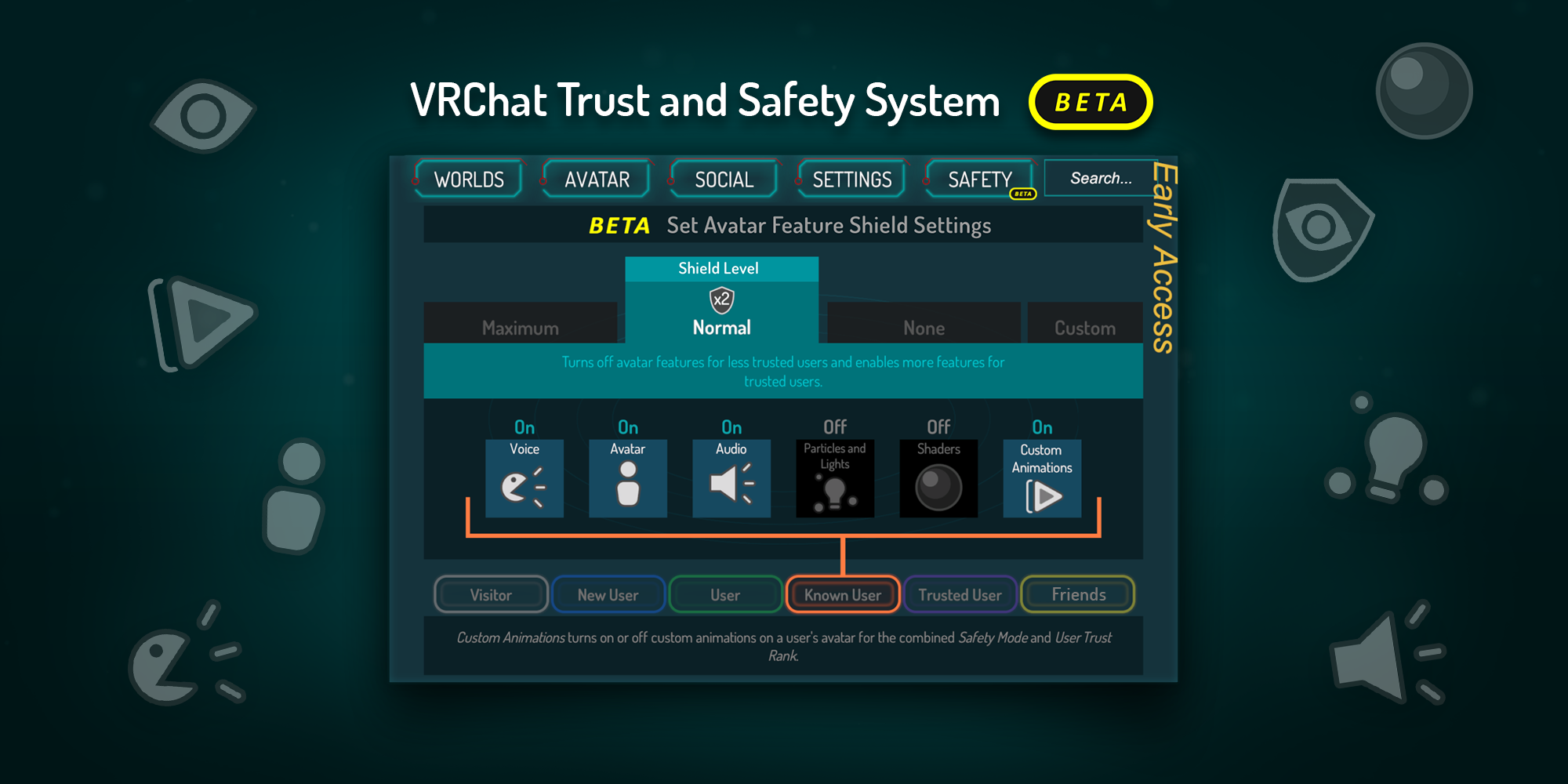
VRChat was updated today. The update is pretty much what was featured in the VRChat Beta. But here’s the full list, for your reading pleasure. There’s a lot to cover here.


Taking center stage, is the new ‘Safety’ tab (seen above). This system is still in Beta, so new/improved features should be coming to it. You can read more about it here. It also better explains the UI changes.
Which include…
-A complete redesign of the quick menu, and better understanding of what
mode (Sitting/Standing) you’re in (when in VR).
-The ‘System’ tab has been renamed to ‘Settings’.
-‘User Real Height’ is now located just above the ‘EXIT VRCHAT’ button. I personally don’t like the placement of this in VR. It was easier to click on, where it was before.
-Mic volume is now in the Settings tab. In addition, the mic indicator in the Quick Menu has been changed (green when on, red when off).
-You can now favorite up to three avatars (avatar pedestals only). In the future, they’ll make it possible to better organize your uploaded custom avatars (REALLY looking forward to this!!).
-Offline friends are now hidden, until you click to expand it.
-The Worlds thing in the Social/Avatar tabs, only shows for the ‘Visitors’ tab.
-It’s no longer possible to block/mute all avatars in a world (though the old System tab). A Canny post is available if you wish for the Maximum option (in the new Safety tab), to do the same thing as before.
-‘Safe Mode’ no longer works as it did before (because of the new Safety changes).

Finally, there’s been a small (but pretty interesting) change to the SDK. From what I can understand, this’ll try to remove errors Unity doesn’t recognize.
So be sure to update your VRCSDK version when you got a chance. You know the drill.

.
EDIT: A hotfix was released the day after, containing the following;
– Fixed an issue which caused full-body tracking not to initialize properly, preventing it from working locally or remotely
– Fixed an issue causing strange stretching/bending when crouching in desktop and looking up/down {DEV NOTE: Desktop crouch issues may still occur on occasion, but can be fixed by swapping avatars}
– Fixed an issue causing other users’ camera indicators not to appear when they have been spawned
– Fixed an issue causing stations (seats), portals, onTimer triggers, and various other components not to work properly in some cases

Posted in PC | Comments Off on Checking out VRChat’s ‘Trust and Safety’ update

Moss – Played and Completed, thoughts

Being given some extra money from my mother, I decided to buy one of the premium VR titles. This one is a game I’ve only heard of once, from Playstation’s YouTube account. It was announced in E3 2017, and had a release date (and gameplay footage) early this year, including this video.
Originally for the PSVR, it’s now for all current VR headsets. It features a mouse named Quill, who’s quite the explorer. The thing is, this isn’t only her story, for the VR player also is a part of this. But the concept of this style of gameplay is far from original. For it was done in a game called Tearaway Unfolded for the PS4. The story was different, but the concept pretty much was the same. In that game, you used your controller’s lightbar to manipulate things in the world. In this game, you use your controllers to manipulate things in the world. See any difference? One extra controller, OK. But overall, not really.

Now don’t get me wrong, this game is absolutely beautiful. The levels feel.. real. Rotating your head, you can see nooks and crannies that you couldn’t before (which you can help Quill get to).
Quill herself is so adorable. She’ll even react if the player gets close to her. That level of immersion is just.. wow.
My only complaint (other than the movement controls feeling a bit loose(such as Quill moving on her own)), is how short the story was (for how much money they asked for). But at the end, it’s mentioned ‘This is the end of Book 1″, and “Your journeys with Quill are far from over”… a possible series, starting next year?
Let’s hope. I want to see a ‘Moss 2’, or something (or free DLC).

Posted in PC | Comments Off on Moss – Played and Completed, thoughts

Benie’s VR Adventures – Day 4

Yesterday was mainly in VRChat, hanging out with friends. I was in this basic world, but as basic as it was, it’s also a VR paradise.
It’s a sandbox’ish world, with Unity cubes and Unity spheres, with several platforms clearly made in Blender. But that’s not all. It has these silly gloves for two VR players.
Once grabbing them, you can control them. There, the world turns into your personal sandbox (as a giant). You can also fuck with other players who don’t have these hands (if they have hand colliders enabled)!
Currently, you can pick a player up by scooping them up with your big hands. There you can play games such as keeping them from hitting the floor.. or simply annoying the fuck out of them (which is far more hilarious).
I had WAY… way too much fun with this!! I absolutely LOVE this concept! VR RULES!!
And the Unity blocks and spheres? You can also hold these in your hands. One was able to figure out how to actually grab them, but wouldn’t show or tell me how.

After that, the rest was hanging out with friends in laggy (in VR) worlds.. blah ‘de blah. If you can’t tell, I’m starting to get tired of this being the only VR game I have, that uses the motion controllers. I want to play something different, but sadly I won’t have any cash ’till next month.

But I found a ‘game’ (more like a tech demo) that’s free (and was once exclusively for the HTC Vive(but has been patched to work with the Oculus, and WMR)), and I seem to remember Dan playing it back in the day. It’s called The Lab; a Portal-themed thing actually created by VALVe (featuring those small 2D people) where you’re the test subject of this unique device, that you can shove into your face (literally), and it’ll take you to a mini-game that’s connected to the place. There are several of these.
Playing it, clearly it’s meant for the VR user to be standing up (and that you can rotate 360*), as there’s no option to spin yourself around.

Had a lot of fun with it. My favorite mini-game (so far), is this ‘defend your ship’
game (that reminds me of Dan’s first VR game). But instead of yourself being the thing they shoot at, it’s a ship in your hand (that you can choose to either be in your left or right hand at the start). And holy FUCK does it get INTENSE sometimes!! I can see the bullets and missiles heading right for me! IT IS SO WILD!! 😀
God.. DAMN! VR is awesome (if I haven’t said that enough already).

I also played this archery game, that I definitely remember Dan playing it. It starts out as shooting things. If you hit the little guy with the red flag, it starts the gamemode, where you have to defend your castle gate against invaders.
The bow uses realistic physics, so you have to aim high to defeat them. I sadly didn’t do so well (possibly because I was in a sitting position all of this time.. again, it expects you to be standing up).

One other mini-game I played.. that I quickly got out of because it became so intense that I had enough, was this odd little.. horror world? Starts off as you showing up. Then about 30 seconds later, this guy comes into this shop and gives you some kind of Mage light that you can hold in your hand.
Here, you use it to fend off enemies that occasionally pop up. What scared the shit out of me, was hearing shit that sounded like it was on the left of me (but seeing nothing). Oh geeze, I don’t do well with this level of immersion. Too freakin’ real for my tastes. lol
Especially this demonic jack in the box infront of me.. fuck.

I’ll definitely be going back to this tomorrow, as well as trying to find more free VR games (that are cool) for me to try out.

Posted in PC | Comments Off on Benie’s VR Adventures – Day 4

Benie’s VR Adventures – Day 3

In a few hours from now, it’ll officially be one week since I got the Lenovo Explorer. And of today’s VR Adventures, I’m happy to report that… could strangers actually be right, that I’m actually starting to get used to this ‘VR sickness’?!
Yesterday was actually a good day in VRChat. Instead of hanging out with Kovo and his friends, I decided to stay in private worlds and start doing a list I wrote down (based on how intense the activities would be on my eyes and overall perception) of all the things I wanted to do in VR, just for this moment.
But before I did anything, I tried setting up my play space again (my acquaintance told me to keep the headset pointed at the monitor at all times (while tracing). I assumed you were supposed to keep the headset pointing ahead at all times. But I tried the best I could, and this is the result…

And the thing actually shows up in VRChat, and I think I get why it’s needed. It seems to help keep the perception of your space in check at all times (so you don’t feel you’re ‘floating’)… I ‘guess’ at least. It actually helped, though. I didn’t feel anywhere as sick as I did in the past.

So without any further delays, here’s what I did in VRChat (in VR);
Bowl in VR (Rock ‘n’ Bowl). ..Moderate Intensity
I still remember this being one of the things I did on Day 1 of installing VRChat. Doing it in VR… when people say it’s so much easier in Desktop mode, they were right. And this is the first time I actually did something in VR while standing up. But for some reason, I was crawling on the ground (even after setting my real height).
I ‘fixed’ it by setting it to Sitting Mode.. how odd, but it worked. I was able to bowl while standing up. And I bowled like that Angry Beavers episode of Dag trying to teach Norb how to bowl (and him throwing the ball everywhere).. that was me. lol
I tried desperately to get the ball to go right in the middle (trying to focus over and over), but either it went in the gutters or actually hit some pins (on the right).
Eventually I got fed up, and went to the next activity.

Go to the Archery world and use the VR bow… Minimal Intensity
Still standing up, I grabbed the VR bow. It took quite awhile trying to get the perfect
angle (while also dealing with the tracking limitations of the motion controllers). Didn’t do so good, but I at least had fun.
On to the next activity.

Practice at Battle Discs… Minimal Intensity
Remembering the first time doing Battle Discs in VR, I was messing up all over. But now, I know how to throw them. Though I still need to work on the direction of my throws.
This actually wore my arms out! But it was a good pain. The highest score I got was 8 before I had enough. Eventually I was able to sit back down for the next activity.

Go to NieR: Automata Flowers… Minimal Intensity
I don’t remember who originally told me this, but this (apparently) is the place once you have VR, where you can relax (as your perception of the world changes). The reason is you can touch the flowers, and they’ll do their little particle effect.
It was alright, but I got pretty bored. On to the next activity.

Go to Universe Creation and play around… Minimal Intensity
I remember the first time I went here in Desktop mode. It was quite wild. It’s a fictional solar system sandbox, that you can use a black hole to spawn in new planets and moons. You can pick up the planets and look at them (up close in VR). The shadowing is in realtime, so you can create create solar and lunar eclipses. It’s freakin’ wild.
You can even pickup the flaming orange ball of plasma (the star) and destroy planets with it. Love this world. Just wish more could be added to it (like planets with rings, neutron stars, nebula, asteroids… shit like that). Then I would be playing Elite: Dangerous in VR.
On to next (and final) activity. There’s more on the list, but this would be it for the day.

Go into VRHat and put hats and shit on you… Moderate Intensity
VRHat is an interesting world. It’s like the part of the new Hub (that has a mirror and you can put stuff on you), but without everything else.
In VR, I can put things on my avatar and they’ll act like they’re parented to it. It’s quite awesome. Unfortunately, due to the limitations of WMR, I cannot put a hat on my head.
Instead, I put a dog tongue on my mouth, and shades on my eyes. Pulling the personal camera out and trying to get a really badass looking pose, I end up pulling the props off me instead of adjusting the camera.
This took nearly a half an hour of constantly resetting the props back into place (and getting the pose I’m looking for), I finally got something I’m currently using as my Discord profile picture…
|
I look so stylish with those shades. Ladies, don’t crowd all at once. 🙂

.
.
.
After that, the rest of the day was quite frustrating. I was -trying- to stay at a stable framerate (while joining friends), but I couldn’t. In certain worlds, I was getting 15-30 FPS (even with avatars blocked). This is why I was unsure if I should sell the VR set.
But… I’m starting to realize these framerate drops are a thing now. And, I think my brain is too (at least, right now). Infact I feel my symptoms not as bad as they were the day before (and I didn’t even use VR as long back then as I did yesterday).
This is a great sign that my body might be starting to build an immune response to the effects. That, or the boundary is actually helping me.
Also, closing out things like Firefox and Discord, have a very minimal impact on the FPS. In other words, it’s highly likely that closing them, doesn’t substantially help me.

And that’s about it. It’s been awhile since I was able to end a VR Adventures blog post without bitching at my computer.

Posted in PC | Comments Off on Benie’s VR Adventures – Day 3

Time for a change of pace (Dissecting the Dutchie)

Something I’ve been putting off for months (even past the point where I said I was going to do it). But last night, before bedtime, I finally swallowed my pride and got the Dutchie model in Unity. Just now opened the Scene file to pull up the info I need.
This is mainly to (hopefully) help better improve BenieTheDragon Boi. And the results of the dissection of this model’s animations, were quite surprising.
And just to make this clear, no Dutchies were harmed in the making of this blog post. I was given a dead Dutchie in order to do our experiments on (in the name of science!!).

Let the DragonRP commence!

So what my dragon researchers (and scientists) have found from dissecting the body, are thus;
-It appears all Dutchies are born (and die) with a smug on their face. Attempting to punch the specimen in the face showed no change (even though it felt good).
-Examining the feet of the Dutchie, it appears this specimen wasn’t able to fly. Our researchers mention that Dutchies have to go through rigorous training in order to do
so. But it appears this one chose to stay on the ground. What a waste of perfectly good wings. Pfft.
-The breath fire animation isn’t like my attempt. The fire breath system (aka the particle system) has been removed from the body, and should be attached to a weapon (for a upcoming plan of my model).
-Managing to detach the wings from the rest of the body, my researchers were able to discover three key things…
1. The wing flap animation has no ‘rested’ state. It’s always extended. This might explain why my wings are twitching when extended (or it’s just VRChat being an ass).
2. Further dissecting into the wing tissue (it actually made me a bit queasy IRL typing this) has revealed dynamic bone settings. These figures have been copied, and will be pasted over to my wings.
3. An even deeper scan on the wings (and the body) shows every animation has Loop Time enabled. How odd. Our scientists are still trying to figure out why.


RP aside, I have everything I need to make the adjustments to my model. Though, I also found something quite disturbing while looking in the documentation (incase it shows how to ‘install’ the hover/flight mode)…

Oh you God damn smug bastard!! 😈
On top of that, there’s a ‘page’ emote that has his Discord picture.
Researchers, I need more brain bleach!

Posted in Other, PC | Comments Off on Time for a change of pace (Dissecting the Dutchie)

HDS 1 solo’d in VR, or how I learned to hate the controllers

Yesterday, I managed to solo Part 1 of the HDS. Had a lot of fun, and it felt slightly different than it did in Desktop. And best of all, it didn’t lag like shit!! It stayed at 50-60 FPS!
Though my biggest enemy, wasn’t the final boss or a hard puzzle.. but the motion controllers. Moving when I don’t want to, not jumping when I tell it to, and the constant spinning. The batteries are brand new, and have a good charge. So it doesn’t make sense I was having so many issues with delayed inputs.
This problem started showing itself while in Big Sister’s Room, moving into walls (when I don’t tell it too).

The second time it got problematic, was in The Halls. Though this time wasn’t the movement controls, but failure to understand where the fuck was the hitbox for the torches.
One time I managed to grab a torch in both hands (which was pretty sweet). Then after dying a few times (some of the jumpscares were really good), I was having trouble transferring a torch from my left to right hand. I kept trying to grab it, but it wouldn’t work. Instead I end up dropping the torch, and having to bend down under my computer table to reach them.
Then when I manage to grab them, for some reason my left hand is acting like it’s losing tracking, or grabbing it from the wrong direction (and then dropping it when I thought I had it in my other hand, in order to rotate the torch). It was quite frustrating, to the part I just thought “fuck it, just grab one! Use your other hand for the buttons!”
And that’s what I did, and it worked. Celebrated when I was able to get them all.

Getting through the first stage of the memories (before the boss battle), I had to squint my eyes due to all the flashing that was going on. In Desktop, this isn’t a problem. I didn’t even have a problem with the chain room, which is surprising (thought for sure I would).

Then it was time to defeat Big Sister.. or just spend 10+ minutes doing the first fucking stage. THIS is where I wanted to break the motion controllers in half!
Me: Jump!
Controller: Ignoring command, going off the edge!
Me: Go forward!
Computer: Sliding off the platform at an angle!
The only…only way I was able to complete it, was through cheating (flight mode). I don’t see HOW in the fuck I’m going to be able to do Part 2’s boss fight parkour challenges. Not without help, at least. Because those fucking things are timed, and with how 50/50 the controls are to respond to my commands…

As a ‘sneak peak’, I tried to do the second HDS world last night (before it became too much, and I had to get off). They have made Teddy possible to use in Desktop mode now! However, it clearly states (and I even said this before), you have to do it as a team.
How they were able to get it, is the neurolink chambers have been adjusted that you can walk into them (instead of sitting down).
I made it to the Firewall Room, and I think they made it harder now (where if a firewall gets you (even if you get one right), it resets. Plus, with the way the motion controllers didn’t want to respond correctly, I didn’t have enough time to click on the first one and get out of there. I have to verify this in Desktop mode one of these days.

And what made me give up, I had teddy in my left hand (while trying to hit things with my right). I accidentally somehow managed to grab teddy in my right hand (while trying to click one of the options), and didn’t realize I did (squeezing it in my right hand) until I let it go… damnit!! To complete the Teddy challenge, you have to hold onto teddy through the entire world. That’s the whole point of the challenge.
(Literally) didn’t have the stomach to do that all over again. Maybe in the future, I’ll do it. But I think I’ll do it with friends, until I get a feel of doing the challenge on my own. Because I can’t be fighting with my motion controllers while being chased.

Posted in Other, PC | Comments Off on HDS 1 solo’d in VR, or how I learned to hate the controllers

Testing the limits of my hardware / VRChat Beta (is buggy)

Last night (after completing the last blog post.. that I actually wish I could write in VR, as that would be fucking awesome), I put my headset back on and tried to install some of the VR games I already have. Subnautica, Race the Sun, and even Google Earth VR.
The first two games I mentioned, both require a controller (not hand controllers, a game controller. Aka my PS4 controller). They also require a keyboard/mouse, and that’s hilarious when you got something over your eyes, and you can’t see your keyboard/mouse. It’s like being blind, trying to find things.

And the third… didn’t render right. It’s a known issue, but there’s no fix. Awesome!
Basically, I tell it to run in VR (through SteamVR), but I see nothing coming through the headset (just eternal blackness). I take it off, and see it being rendered on my primary monitor (while tracking the headset). The motion controllers also show up (in the desktop window), but not in the headset. This thing is supposed to have WMR compatibility, but it just doesn’t work right.
There is a workaround that I’ve seen a few people use (and works for them), to use the Microsoft Cliff House and find something that’ll show your Desktop there. I remember seeing something before, closing it out, and I can’t get it back up. So that’s unfortunate.


Later I decided to join a few friends in VRChat (and surprise anyone that hasn’t seen, that I have VR now). Asked for an invite to this private world they were in, and got sent one. As I was trying to join, I’m getting a call in Discord. Typically this wouldn’t be a problem (with Desktop). But when I only see VRChat (and nothing else), I have to take off my headset, then move my mouse over to Discord, open it up, and accept the call.
They’re telling me to get the beta, saying it’s the only way to see them. Read about this in the VRChat Discord server a few days ago, how you can’t see people that don’t use the Beta (and people who don’t have it, can’t see you if you use it). That’s stupid!!
But after asking if I would be able to opt out (and nothing would be fucked), I got it installed (could only do it in VR though), and got in.
…Immediately, my computer was struggling to stabilize itself. But after awhile, I was getting an FPS about 30-50. Playable at least. I was also stuck in that full body tracking bug I had before (with VRChat assuming I was using full body, because I’m always in a seated position). Gripped both the primary triggers and was able to regain control of my avatar’s arms and hands (as I was taught before).
Trying out the camera, it feels so much more stable in the hands. Plus they swapped the buttons around, making it easier to press them! There is also a new Safety tab, that you can control seeing particle effects and stuff. VERY nice for VR users! Even in Desktop, some particle effects nearly blinded me.
These are the only options I actually liked about the beta. The rest, they really need to polish.

At the end, I decided to opt out (and so did everyone else), feeling the beta was way too buggy. One was unable to even use the beta anymore.
Good attempt, but as I said, it needs polishing.

Anyway, today I plan to solo both of the HDS worlds in VR. OOF! Going to be a new experience. Though I feel, given with how massive the size of these worlds are, it’s going to run like shit on my computer. But, I said that with VRChat in general. I’ll never know until I try.

Posted in Other, PC | Comments Off on Testing the limits of my hardware / VRChat Beta (is buggy)

Benie’s VR Adventures – Setup/Day 1

Yesterday was pretty crazy– getting VR, going through hell setting it up, Windows Update nearly kills my computer. But it all worked out at the end.
And, for the first time in my life, I am happy with my purchase (and the product). It literally does what I’ve been told; turns VRChat into an entirely different game. Where everything feels real. Avatars feel real. …There’s just no other way to describe it, except HOLY FUCK I LOVE VR!! 😀

So the delivery came around 3:47pm, and I was super hyped (yet also reminding myself that this thing could be DOA).
Checking the documentation, the headset requires an additional USB 3.0 port (on top of the Bluetooth 4.0 adapter). But I got it to work.
All there was left is to install the non-rechargeable batteries in the controllers (note to self, buy them next month). I should had asked if they could be charged.. but I didn’t. My fault. Thankfully it’s not the end of the world, as I have more batteries (to hopefully get me through next month). Then all there needs to be done, is to run the software.
That software is ‘Mixed Reality Portal’.

First problem I ran into was ‘Connect your headset.’.. when I already have the cables connected to the back of my computer. Great way to get rid of all that hype.
Spoke to my acquaintance, who tried his best to help me (while I tried my own attempts at fixing, but to no avail).
Noticed Windows Update had a few new updates available, and remembered that this was the way to get the drivers needed for the Bluetooth adapter. Installed them, and then decided to do a scan for more updates. Sure enough, three new ones popped up.. including a quite promising one named ‘Microsoft – Holographic’.
After it installed, Mixed Reality Portal re-opened itself. Clicked on the button as I did before…and it went past the message!! YES! It was telling me to set up the controllers. And as I was doing that, Windows Update said “I need to restart”.
I’m alright with it, and allowed the restart.
10+ minutes later, the screen is still saying “Preparing your PC”. I was going to give it a half an hour, but I felt like this was taking a ridiculously long time (and did what it said not to do.. turn off my computer).
Turning it back on, Windows tried to load, and froze on the Windows 10 loading screen. I thought for sure I had fucked the registry (or something). Waited 15 minutes, praying my computer would recover. Then I walked over to it, and noticed a small button next to the hard drive activity light. Assumed this was a reset button and pressed it.
Whatever it was, was a problem solver! Computer booted into Windows… then telling me “a previous USB device that was plugged in is malfunctioning, and Windows cannot detect it”.
I thought it was the headset, but it was the Bluetooth adapter. Pulling it out and putting it back in, fixed that problem. And I was able to complete the installation, paring the controllers to my Bluetooth adapter.

Then, it was time to experience VR for the first time in my life. I was taken to this cliffside villa, where I was taught how to use WMR. I was expecting to feel motion sickness, but I never did. This is damn promising, and so was the framerate. Who knew that a GPU upgrade had been separating me from VR.
Taking off the headset for a bit, I… I was fucking blown away. I was able to manipulate objects, and bring them so close that I swore it was sitting on my lap!! The level of, mind fuckery… I don’t even have words. This is just truly remarkable.
To think just.. what, 10 years ago? …this shit wasn’t even possible!! How fast technology has exploded, is crazy!
Then I tried to go for VRChat. SteamVR wouldn’t detect the hardware, that was until I found there’s drivers that emulate the HTC Vive (so WMR can use it).
After it was installed, SteamVR’s tutorial came up. However, came up in an unexpected way. One of the cores from Portal greeted me, and then went behind me, telling me to hit the buttons on my controllers.
I didn’t see my controllers infront of me, yet I was still able to use them. I was forced to turn 180* around in my chair to see what was going on (and I still didn’t see the controllers in my hands). Ended up closing it out (as it was telling me to ‘press the MENU button’ (which only brought me back to the Cliff House), and with the help of my acquaintance, was able to launch VRChat in VR mode.

Freaked out when I saw my hands infront of me! No more broken arms! WOOT!! Now it was the grueling task of learning how to play VRChat in VR. And this started with having my mic muted (and being unable to toggle it on my keyboard). Turns out, enabling the mic to always be on (and then restarting VRChat) is the key.
Soon I had a fairly good understanding of the controls. I even tried out the personal camera, which is a Pita to use. The fact you can’t really see what you’re aiming at, I ended up creating a plethora of screenshots by accident. Also, the labels are so small to read, that I have to lean in closer IRL just to make out what I’m clicking on. Clearly, this is going to take many days of practice, until I become familiar with these controls.

Played Battle Discs (in VR) for the first time. Wow… okay, this is nowhere as easy as I thought it would be. You have to hold down your primary trigger, and then throw it forward as hard as you can. Hearing myself smack (hard) into the side of my computer (and other objects), I’m pretty sure this thing is best played while standing up (and away from the computer); less risk of smacking the controllers into something important.

As I said, I had a LOT of fun! Though there’s something ‘odd’ about it, how I kept being told that you’ll get motion sickness if your FPS drops below 40. Yet I was in a few worlds (where it was dipping to 15-30), and didn’t feel a thing. I saw the horrible framerate, yet it didn’t bother me. Perhaps my years of staring at a monitor, has made me immune?
Who knows. All I do know is I loved every bit of it!! I can pat people’s heads, I can wave, I can hug people! I’m finally able to do things I could only DREAM about! I felt I had a purpose of playing this game!

Next month, as I said, I’ll be buying a pack of rechargeable batteries (and the charger to boot). I can already see the controllers lose tracking a bit more often than I remembered, proving once again that the battery level means everything (when it comes to wireless devices). But as I said, I have spares. I have Energizer batteries (that are designed for high use electronics), which claim they’ll hold a charge for up to 10 years.
I’ll also be purchasing some VR games, such as Job Simulator. And also that model train game Dan played that I absolutely want.

Posted in Other, PC | Comments Off on Benie’s VR Adventures – Setup/Day 1

PlayStation Classic unveiled, releasing Dec. 3rd with 20 games


{Source}
Nearly 25 years ago, a feat of gaming engineering was born. The PSOne (or PS1 for short), made video game console history by becoming the first to sell 100M units worldwide, “offering consumers a chance to play games with real-time 3D rendered graphics in their homes for the first time.”
And now, they’re happy to announce that history will be reborn with the ‘PlayStation Classic’; a miniature-sized version of the PSOne. 45% smaller than the original, with two controllers (for local Multiplayer on certain titles), and powered with HDMI.
It includes 20 fan-favorite games, such as Final Fantasy VII, Jumping Flash, Ridge Racer Type 4, Tekken 3, and Wild Arms.
Current price estimates, suggest an MSRP of $99.99 USD ($129.99 CAD). And the release date is estimated to be December 3rd, 2018.

I absolutely hope Mister Mosquito is also in the list, as that’s one of my favorite games.

Posted in Other, PS4 | Comments Off on PlayStation Classic unveiled, releasing Dec. 3rd with 20 games