I dunno how to start this one. Jero doesn’t even know about this, as I want to keep it a secret from him until the time is right.. where I could kill two love drama issues with one stone (this and how I would like Fluffy to be like him).
There’s just something about him; the way he walks, the way he talks.. just makes my heart flutter, as if I truly met ‘the one’.
Essentially, he makes me feel like this;

Yet why oh why did it go so wrong with the doubts?! Though he has answered all of my questions and I’m forced to move on (how he has a BF now), I still can’t get him off my mind. And I just wonder at times if he feels the same about me, yet is too scared to come up and express them.
I was hoping to get Fluffy to ‘replace’ him.. but instead of doing that, he indirectly gave me an idea to want this. I don’t know why it took until now for the idea to suddenly pop in my head.
–
Asked Kat early yesterday morning for the model and was given the green light (but she was at work and asked me to let her know later). That later time came when I noticed her on around 7:30pm, but didn’t respond to me until 9:15pm (when I was playing Raft with Kovo and Wufy). Told me she had to send the project she made when she was working on the various versions of that avatar, and when I tried it out later on… it’s full of ‘Missing Prefab”s.


FUCK!!!
Tried to reimport the Angel Dragon model, didn’t fix it.

Unity!!! D:{
–
This morning, I took a closer look at the issue. The modified ADModel.blend, Unity claims the model doesn’t have the bones needed to make it into a Humanoid avatar (like it was completely un-rigged). So I took a look at it in Blender to further investigate the issue. God damn I wish I had the knowledge to close out these windows!!
The armature was indeed there. Strange. Looking at Cats, I saw a ‘Fix Model’ button and tried it. This was its result (after changing the color of the mesh);
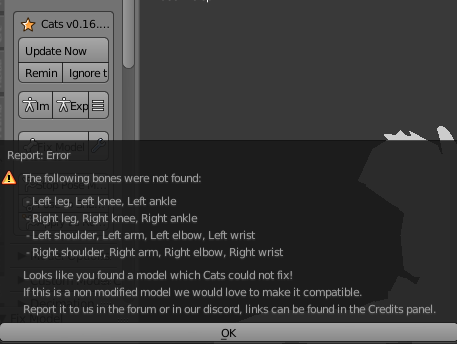
So the Hip to the Spine seems to not be connected to the other bones, which is crucial for a Humanoid avatar. Ugh.. fuck the age of this model!! Told Kat the problem and what I tried to do.
Around 11am, she responded back saying I “shouldn’t have to open the model in Blender”. And said for me to try and select this ‘Open Scene Addictive’ under Assets…

Grayed out. Then before she left to go to work, said I might have to use an earlier version of Unity (“the one they used in June”).. that means I also have to find what SDK version they used back then.

WHY, Kat. WHY. Okay, just relax, I’ll wait ’till after she gets back from work.
I was trying to get some more pictures for this section (such as what Unity was bitching about of the model not having enough bones).
…Yet Unity kept crashing on me every time I tried clicking on the .blend file. ..The FUCK?! Yes I still had Blender opened, but I was able to do it before! Closed out Blender and tried it again, same issue. ..Uhh, WHAT is going ON here?! What did I DO?! I didn’t save the changes Cats did in Blender!
Opened up the .rar and replaced the .blend file with a fresh copy.. the issue persisted. Then I tried deleting everything from the project folder and added everything from the .rar.
Opened up Unity. It did its processing, and I see this…!


…Um. Okay!? So it’s working now! I guess this was the way I should had done it (deleted what Unity had installed when setting up the new project folder, and moving the contents over).
Well then, I’ll call this a victory! …But something crossed my mind, of the hell I just went through. How in the fuck am I going to move this into the dancer scene (and have it intact like this)? Due to the age of the model, I don’t think I can pull it off like I did with Cola and Red’s avatars (or even what needs moved over).
But with time (and patience on my end), I’m sure I can do it (and hopefully not fuck up BTD 3.0’s model in any way, shape or form).
And that’s kind of been what I’ve been doing most of the day, using the same written system I did for Fluffy’s model that Kovo made, to mark what gets moved over. But there was one thing I was confused about; the new ShapeKeys of the model. Why is ‘WingSpread’ set to 3.76? Shouldn’t it be 0? There were three others that clearly aren’t there by default..

Testing them out, the ‘Oh Baby’ is what controls the custom blush. And ‘That Ass
tho’.. well, I’m sure if I was good at BlendShapes and did this for my main model, Blue wouldn’t leave my ass alone (as it controls the THICC)… and I can’t believe I just said that!
And ‘floof’ is an odd one (as it’s reversed). 100, removes the chest fur. Weird.
–
Asked Kat mainly about the WingSpread (as it’s part of the original model) of why it was set to that. She claims “any settings it has were in the upload”. So I take it you didn’t do the ShapeKeys. Well then, who did? ..Oh well, but thank you! And thank you for letting me do this!! 😀
Went to go play some VRChat. When I was done I went back to this and tried just moving the model over (making a backup of the original ADModel.blend). Got in Unity and checked my BTD versions. BTDB 2.0’s missing its Dutchie tail. Tried what I could to fix the problem, but to no avail.. it’s linked to the default ADModel.blend. FUCK!!
Ok, fine. Then let’s try to have it use the backup then. And the backup was doing what I saw before of ‘not having enough bones’.
Both the modified AND the backup of the original are doing this!

So I was pretty screwed at this point. I thought I might as well…

…it’s time for me to learn how to do ShapeKeys with the new 1.2b model!! But I wasn’t about to throw in the towel just yet. Asked the VRChat Discord for help, immediately got a somewhat helpful “the answer’s right there. Either set it to a Generic rig or re-attach the bones in Blender” answer. And knowing the Generic rig option isn’t working.. I need other help!
Someone by the name of ‘kohi’ tried to help me with this, discovering there is absolutely nothing wrong with the model (it’s fully rigged), so the fault is Unity. Then he tells me something I kind of wish Kat told me, but she probably overlooked it; to export it as an .fbx.
Did that, and I saw a model! But when I dragged it into the scene.. I immediately noticed an issue– the ears are stuck in the ‘sad’ position. So this is the new ‘jaw stuck hanging open’ issue.. UGH the AGE of this model!! Setting 100 of the ‘DroopyEars’ BlendShape caused the ears to look like Dumbo;

Not good!! HOW am I going to fix this?! I knew Kat wouldn’t be able to help (she’s done all she can for me). Then I had an idea of creating a prefab of Jero’s model and hopefully do that. Will Unity allow it??

Uhhhhhh….

UniTY!!!!!! Answers. NOW!!! This is NOT a Dutchie!! It’s a monstrosity!
–
After dinner, I looked again at the model. Maybe I can manually adjust the ears? Using BTD 3.0 as a base for the height and ear placement, I did as good as I could. Tried setting DroopyEars again, and it looks like it works! Sweet! At least I pray it stays like that.
Moved the eyes over. They were still using my BTD 3.0’s eyes, and did the necessary renames to make sure there would be no conflicts. Had to manually set them (the monstrosity did come with the eyes by the way). It took awhile, but I feel I got them set.

My heart (when I see those eyes, and can almost hear his sweet, calming voice that I fell inlove with)…

I totally don’t have a stupid grin on my face right now. …*clears throat* Sorry for this post taking so damn long.
—
I feel I’m pretty much ready for the idea now– getting the dances I feel would fit Jero’s personality best. I got all the dynamic bones moved over (thanks to the prefab).
The only thing I feel I still need to focus on, is how to get the blush to show up (without an animation). And I feel it’s going to be the same as Cola’s blush (aka it’s not possible unless I set it within the dance animation). Poses though, won’t be a problem.
Speaking of the dances, I might ‘barrow’ a few songs from the group, to symbolize that Jero also has a lewd side (that he definitely showed once, and I still remember.. and how I wish Fluffy could compete with it if only he wouldn’t get tired so easily).
And speaking of that… heh. Suggestive Jero poses. Recreate that fun time we had?

…FUCK you! You don’t care about what I’ve been though!!